Hero11 Fantasy
Put player teams together or look through cards for match predictions. Begin from the match that is listed and from the rules of its contest.
Teams · Predictions · Match cards Explore FantasyDownload Hero11 for Android and choose Fantasy, Sports, Casino or Rummy from the app menu. Explore the categories below and learn where to start after installation.
Android APK · Installation help
Already installed? Open Hero11 on your phone.
Get login help
 View full app screen
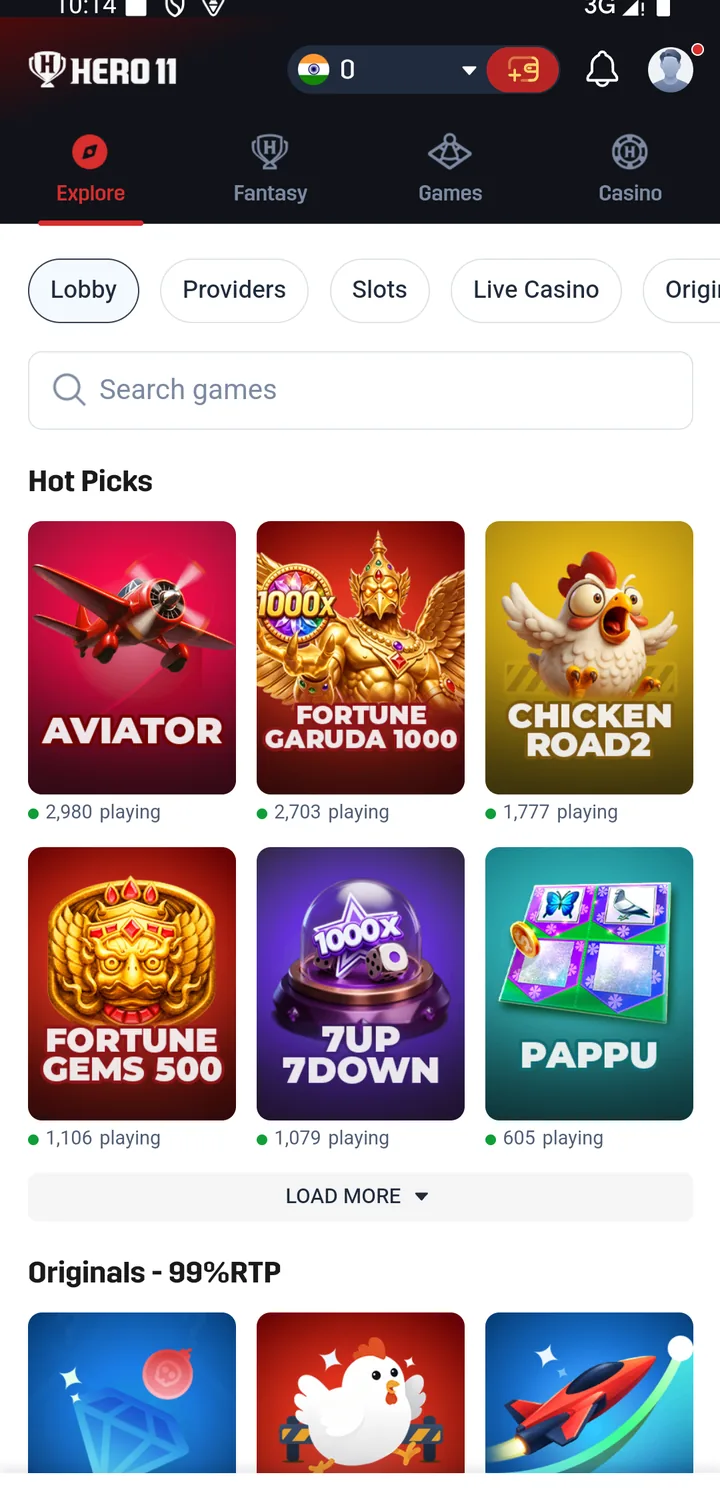
Hero11 is an app with Fantasy, Sports, Casino and Rummy sections. You choose a category from the app menu, then open the match, contest or game you want to explore. Each section has its own rules and records.
Pick a section if you want to see the place to begin and what its screens are showing.
Put player teams together or look through cards for match predictions. Begin from the match that is listed and from the rules of its contest.
Teams · Predictions · Match cards Explore FantasyLocate fixtures, scores and betting markets for Cricket and for Football. First select a sport, and after that choose an event.
Cricket · Football · Event lists Explore SportsLook through separate games by category, by provider or by title. To read the instructions and the settings, open a game.
Originals · Slots · Card games Explore CasinoInside the Rummy lobby, locate Points and Deals. Review the mode that was selected, whether Cash or Coins, and the rules of the table.
Points · Deals · Table formats Explore RummyAvailable games and contests are shown inside Hero11. Read the current rules and eligibility before joining.
Obtain the Android app, then open the account you hold and pick a category.
Full Android download & installation guidePress the download button and wait until the APK has finished saving before you open it.
Download Hero11 for AndroidFrom Downloads, open the file that has finished and follow the installation prompts given by Android. Get help with an installation error.
Do what the options inside the app show you. Where an account is already yours, rely on the sign-in method you already use.
Pick Fantasy, Sports, Casino or Rummy. Before you go on, review the format of the chosen game, its entry details and its rules.
Start in Fantasy for contests built around a player team, or for cards that predict a match. Choose a fixture from the list and review its deadline together with its scoring rules.
See how Hero11 Fantasy worksOpen Sports, then pick Cricket or Football. To locate a match, use the lists of leagues and events, and read the conditions that apply to the market you selected.
Follow the Hero11 Sports walkthroughFollowing IPL? Read the IPL preparation guide. You can also compare Fantasy and Sports.
If Hero11 opens on your phone, choose a category from its menu. For account access, keep using your original sign-in method.
Hero11 is an app with Fantasy, Sports, Casino and Rummy sections. Use the app menu to choose a category, then open a listed match, contest or game and read its rules.
The button saves the Hero11 Android file on this site. Let the APK finish saving, then open the completed file from Downloads and follow the installation prompts. The Android installation guide has detailed help.
The reviewed Hero11 interface puts Fantasy, Sports, Casino and Rummy in the same app menu. Start with the category you want and follow any loading or update prompts shown for the selected game.
For lists of events and for markets, open Sports and select Cricket or Football. Where you want contests between player teams and predictions about matches, use Fantasy and review the categories and fixtures it currently lists.
Continue in your existing app if it opens in the normal way. Turn to the update guide when a newer version is required, or turn to login and account help when sign-in is impossible.
The screenshot is a historical interface example. Open Hero11 to check the games, fixtures, offers and rules currently shown for your account.

Get the app onto your device, then pick the category of game you wish to explore.
hero11apk.in is a Hero11 Android guide. Download buttons save the Hero11 Android file on this site. This site does not manage Hero11 accounts or payments. 18+ · Local eligibility and responsible use.
The reviewed material does not establish a wallet currency or points system called “Hero11 Gems.” Do not assume the phrase means Fantasy Coins, Rummy Coins or a cash balance.
| What you see | Where to check |
|---|---|
| A game title such as Fortune Gems | Casino game-name guide; look at the precise title and the provider that is shown. |
| Fantasy Coins or Skill Score | Fantasy Rewards guide; within the recording, these labels stand apart from each other. |
| A Gems label with unclear meaning | Customer Center support checklist; note the precise screen and the wording, and do not share secrets from the account. |
Before a dedicated page of Gems rules can exist, there must be a current definition inside the app and evidence of how the item gets used. Until that exists, the names stay separate in this guide.
Hero11 registration · Login and OTP help · Hero11 to Win name checks
Editorial update: · Hero11